Access control · RFID tags
RFID access control for gyms
RFID cards, key fobs or wristbands: the member taps their tag, Gymza checks their membership, records the visit and (with a turnstile) lets them in. Only members in good standing get through.
How a check-in works
From tag to decision in a fraction of a second.
- Memberarrives at the desk or turnstile
- RFID tagcard, key fob or wristband
- Readerreads the tag number
- Gymzachecks membership and rules
- Entryvisit recorded, door opened
Three plans, one lifetime licence
Start with the software alone, add RFID check-in, or have the complete system with a turnstile installed. Pay once.
Gymza Starter
Professional management for your gym, without access-control hardware.
Lifetime licence
5,000 MAD TTC
One-time payment · no monthly subscription
Prices include VAT (TTC).
- Unlimited members
- Memberships, expiry dates and status
- Payments, receipts and expenses
- Dashboard and reports
Most popular
Gymza Pro
The best choice for most gyms.
Lifetime licence
7,000 MAD TTC
One-time payment · no monthly subscription
Prices include VAT (TTC).
Only +2,000 MAD more than Starter for RFID automation, the reader and 100 tags
- Everything in Starter
- RFID tag check-in
- Automatic membership verification
- USB RFID reader and 100 tags included
Turnkey
Gymza Complete
The complete gym management and access-control system, installed and ready to use.
Lifetime licence
20,000 MAD TTC
One-time payment · no monthly subscription
Prices include VAT (TTC).
- Everything in Pro
- 1 turnstile and its access controller
- 2 RFID readers and 200 tags
- Mini PC for the front desk
- One-time payment · lifetime licence
- 12 months of updates + technical support included
- Optional maintenance after year 1: 1,000 MAD/year
RFID and access hardware
The hardware delivered with Pro and Complete is listed in each plan. Already have equipment? Here is what Gymza can work with.
RFID card
Credit-card format, printable with your logo. EM4100 125 kHz or MIFARE 13.56 MHz.
RFID key fob
Lives on the keyring, so members forget it less often than a card.
RFID wristband
Handy for training without pockets, from the locker room to the floor.
USB reader
Plugged into the front-desk PC to enrol tags and check members in. It acts like a keyboard, so there is nothing to install.
Access controller
Drives the door or turnstile: Gymza asks it to open, the controller handles the relay. Gymza Complete uses a ZKTeco C3 panel, commissioned and tested on site.
Turnstile or gate
Tripod turnstile, swing gate or maglock door, depending on your entrance and budget.
Member display
Pro and Complete: a second screen greets each member by name and shows their membership status at every visit.
QR member card
No budget for tags? The printed member card carries a QR code that does the same job.
Access rules you control
Each rule can be switched on, tuned, and applied to specific entrances only.
- Valid membershipno entry without an active membership
- Opening hoursno entry while the gym is closed
- Plan hoursan off-peak plan won’t work at 7 pm
- Daily limitone entry per day if you want
- Anti-passbackstops tag sharing
- Remaining sessionsa used-up class pack stops working
- Unpaid balancemoney owed can block entry
- Medical certificaterequired for certain activities

Reliability
The PC never drives the motor
Gymza asks the controller to open; the controller owns the relay and its timing. A crash or a Windows update can never trap someone in the turnstile.
With a Door Link controller in hybrid mode, the list of authorized tags is also kept in the controller: members in good standing keep getting in even with the PC off. With Gymza Complete’s ZKTeco C3 panel, the PC decides: we put the PC and the controller on a UPS.
Emergency exits always stay mechanically controlled, independent of the software, as regulations require.
Member display
A personal welcome at every visit
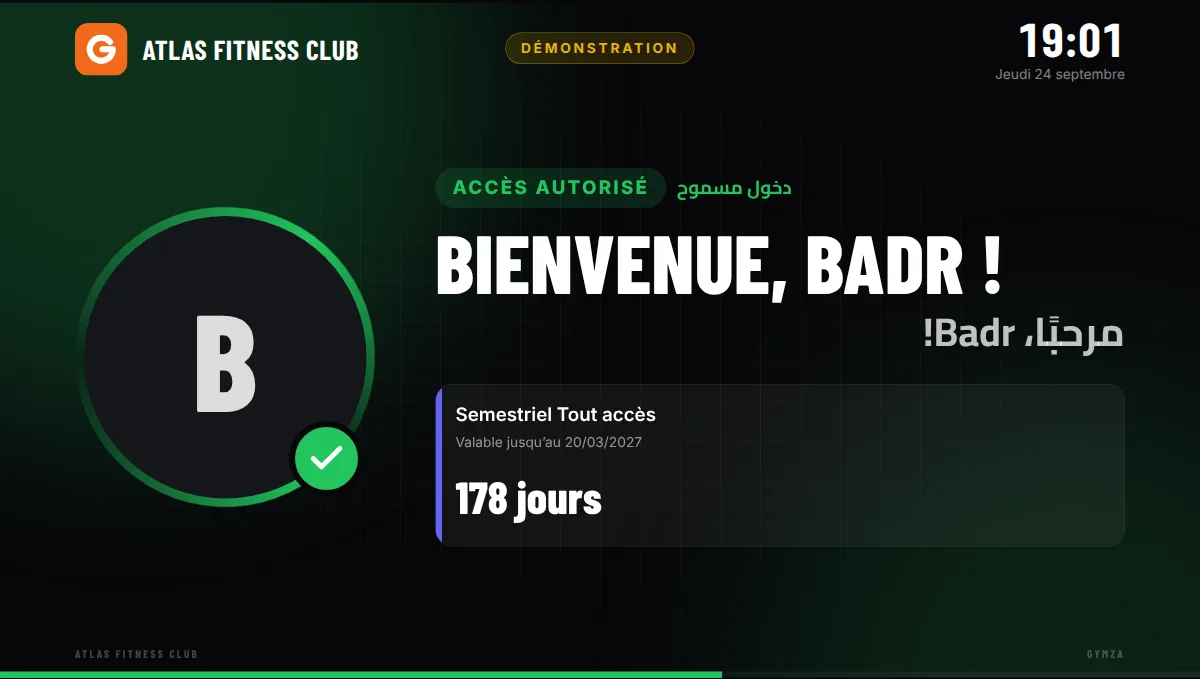
The member taps their tag and is greeted by name, with their membership end date. When it’s about to expire, the screen reminds them at the best possible moment: while they’re there. Included in Gymza Pro and Complete (second screen not supplied).
A refusal never shows the reason in public, just “please see reception”. The exact reason appears at the front desk, for your team.
Test without buying hardware
The application includes a simulator: present a virtual tag, unplug a controller, cut the power, and see how the software and the customer display respond.
Gym access control: the questions to ask
How does an RFID tag work in a gym?
Each tag holds a unique number, read contactlessly from a few centimetres. Gymza links that number to the member’s profile: at every entry the software finds the member, checks their membership and the access rules, then records the visit. Nothing to type at reception.
A reader at reception, or access control at the turnstile?
A USB reader at reception is enough to enrol tags and check members in: that is member attendance tracking, with no heavy hardware. That is Gymza Pro. Automatic access control adds a controller and a reader at the turnstile: the entrance opens only for a member in good standing, even when nobody is at reception: that is Gymza Complete, delivered and installed.
EM4100 or MIFARE: which tags to choose?
EM4100 125 kHz tags are the cheapest and easiest to find in Morocco. MIFARE 13.56 MHz tags work too, as long as the turnstile reader sends the same number as the reception reader. Gymza also recognises the two common ways the same number is written. Cards, fobs and wristbands work the same: choose what suits your members.
And without a turnstile?
Checks happen at reception: the member’s profile opens when the tag is read, with their status and any balance due. With Gymza Starter, without tags, check-in is done from the profile or with the QR code on the member card.
Questions about access control
How does RFID tag access work?
Each member gets an RFID tag (card, key fob or wristband) linked to their profile. When they present it to the reader, Gymza checks their membership and the access rules, records the visit and, if there is a turnstile, asks the controller to open.
The front-desk USB reader works like a keyboard: no driver to install.
Does Gymza support RFID?
Yes. The Pro and Complete plans include RFID tag check-in: the member presents a card or key fob, Gymza verifies the membership, detects an expired one and records the visit.
Pro works with the supported 125 kHz USB RFID reader at the front desk. Complete adds a turnstile, an access controller and two readers, installed and tested.
How many RFID tags are included?
100 tags with Gymza Pro, and 200 with Gymza Complete, as cards or key fobs. Additional compatible tags can be added at any time.
Which hardware is compatible?
EM4100 125 kHz tags (the most common in Morocco) and MIFARE 13.56 MHz; keyboard-style USB readers at reception; network access controllers that speak the open Door Link protocol and drive turnstiles, gates and doors; an 80 or 58 mm receipt printer and a second screen for the customer display.
Gymza Complete comes with a ZKTeco TS2000 Plus turnstile and a ZKTeco C3-200 Pro Plus panel, commissioned and tested on site. Already have a controller or turnstile? Tell us about your project before buying and we will tell you what is compatible.
Can I use Gymza without RFID?
Yes, that is Gymza Starter. All management features (members, memberships, payments, receipts, expenses, reports) work with just a PC. Check-in is manual or uses the QR code printed on the member card.
You can move to Gymza Pro for RFID later, without reinstalling or re-entering anything.
What if the PC is off or breaks down?
The PC never drives the turnstile motor directly: the access controller opens it, and the turnstile unlocks mechanically during a power cut. With a Door Link controller, the list of authorised tags is kept in the controller, so members in good standing keep getting in with the PC off.
With Gymza Complete’s ZKTeco C3 panel, the decision is made by the PC: a PC that is off means a turnstile that does not open for tags. That is why we recommend one shared UPS for the PC and the controller.
Does the Complete plan include a turnstile?
Yes. Gymza Complete includes 1 turnstile, with its access controller, 2 RFID readers, 200 tags and a mini PC, delivered, installed, configured and tested, with staff training.
The exact models are confirmed in your quote, depending on your entrance.
Can I add another turnstile later?
Yes. Several entrances and turnstiles can be connected to the same Gymza workstation. You need a two-door controller (or a second controller), the readers for that entrance, and a licence extension for the extra entrance.
We price the hardware and the extension together, then configure the new entrance.
Can you help with the hardware?
Yes. The Gymza Complete plan includes the hardware (turnstile, access controller, readers, tags and a mini PC) with its installation and configuration.
For another setup, we tell you which hardware suits your entrance and budget, and we configure Gymza with it: the hardware is priced in our proposal or installed by your usual installer.
How do I install Gymza?
Download the Windows installer and run it: no administrator rights are needed. On first start, a wizard asks for your gym’s name and creates the owner account. It takes a few minutes.
For a complete installation with hardware, choose Gymza Complete: we deliver, install, configure and test the system, and train your team.
Planning an access-control project?
RFID check-in with Gymza Pro, or a turnkey system with a turnstile with Gymza Complete: compare the plans, or tell us about your entrance.