New in Gymza 1.3.0
The member wallet: store credit to spend at the counter
Your members leave money with the gym and pay for their drinks, supplements or towels from that balance. The front desk takes the payment in one click, every operation stays in the history, and your revenue figures stay right.

How it works
Money the member puts aside, with you
A member deposits an amount on their wallet, whenever they like. That balance then pays for what they buy at the gym’s counter. It is store credit held by the gym, used at its counter.
An example
- 1
Monthly membership + optional top-up250 MAD + 100 MAD
350 MAD collected in one go
- 2
What is recorded250 MAD · 100 MAD
the membership on one side, the wallet on the other
- 3
The member buys a protein bar− 25 MAD
75 MAD left
- 4
Then a drink− 15 MAD
60 MAD left
At zero, the wallet cannot pay any more: someone has to top it up first.
Separate from the membership
The balance does not depend on the membership: it does not expire, reset or change when a membership expires, is renewed or frozen.
Top-ups
A top-up in four steps, at any time
From the member’s profile: the Wallet tab → “Add money”, or the balance button at the top of the profile.
- 1
The amount
What the member deposits.
- 2
The payment method
Cash, card, bank transfer, cheque, or your own methods. A reference or a note if needed.
- 3
The review
Gymza shows the current balance, the amount deposited and the new balance before you confirm.
- 4
The confirmation
The new balance is shown, with a receipt to print. A second click on “Confirm” records nothing twice.


Or when renewing
When you renew a membership or take a payment, an optional “Wallet top-up” field appears. The screen shows the membership, the wallet and the total collected. Both are collected in one operation but recorded as two separate payments, and printed on one receipt, one line each with the total. Nothing is ever compulsory.
At the counter
Paying for purchases from the balance
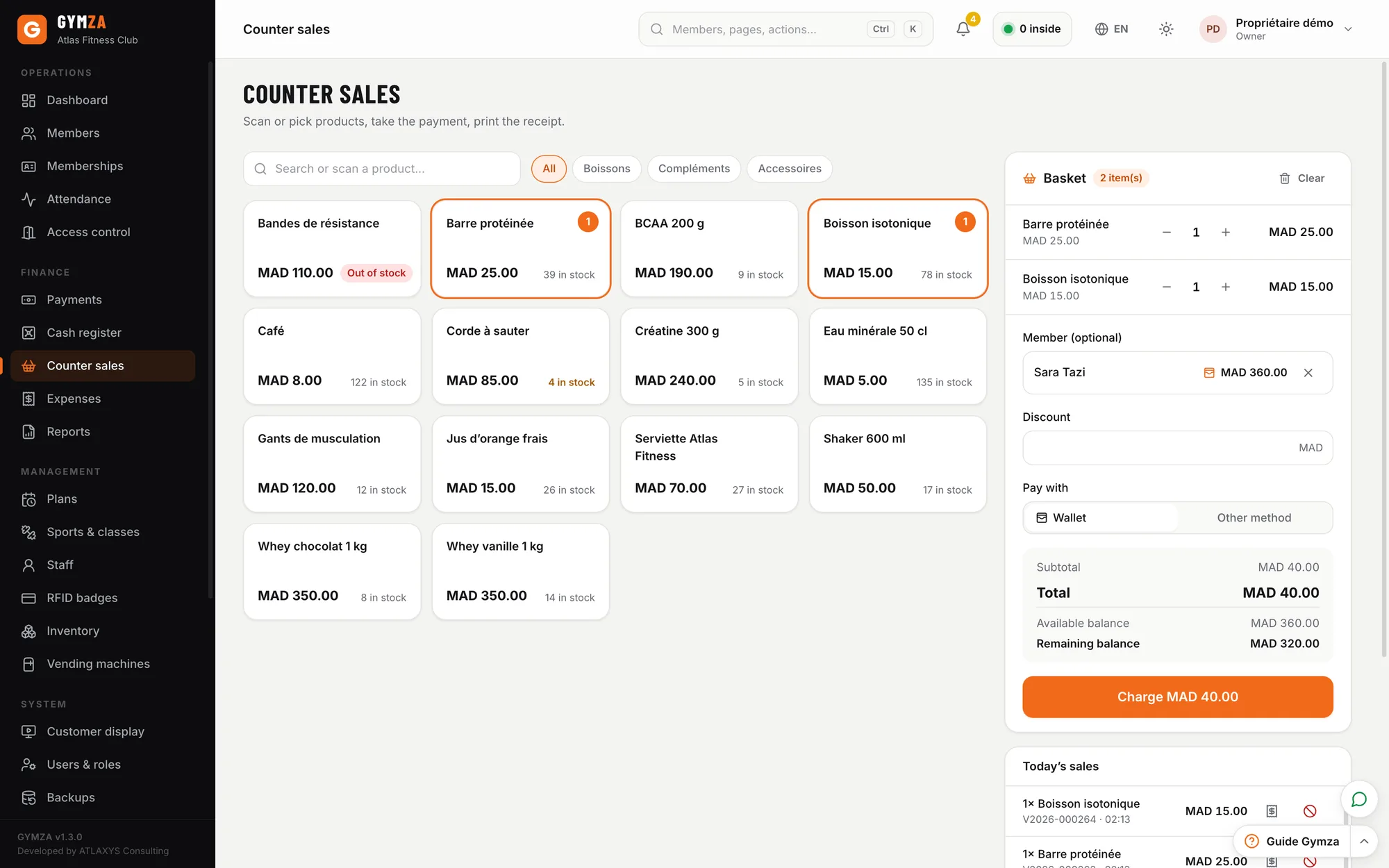
In Counter sales, pick the member (search, badge or member-card QR), then “Pay with: Wallet”. The basket shows the available balance, the total and the remaining balance.
Not enough on the wallet?
The counter says what is missing, for example “Not enough on the wallet: 95 MAD short”, and offers “Top up”, pre-filled with that amount. After the top-up, the same basket is waiting: nothing to rebuild. You can also choose another payment method.
- A wallet never goes below zero.
- A sale is paid one way: never part from the wallet and the rest in cash.
- Stock, discounts and receipts work as for any sale.
- The receipt shows the wallet payment, and the balance before and after the purchase.
- Low and empty balances are flagged on the profile and at the counter; the owner sets the threshold.

Refunds and corrections
Mistakes are corrected, nothing is erased
Every correction is a new operation, visible in the history. Nothing is edited or deleted.
Refund a purchase
A product paid from the wallet is refunded to the wallet.
Refund to the wallet
Another payment of the member can be refunded to their wallet instead of in cash, when the front desk chooses so (“Credit the wallet”).
Cancel a sale
Cancelling a sale paid from the wallet gives the money back to the wallet and puts the products back in stock.
Correct the balance
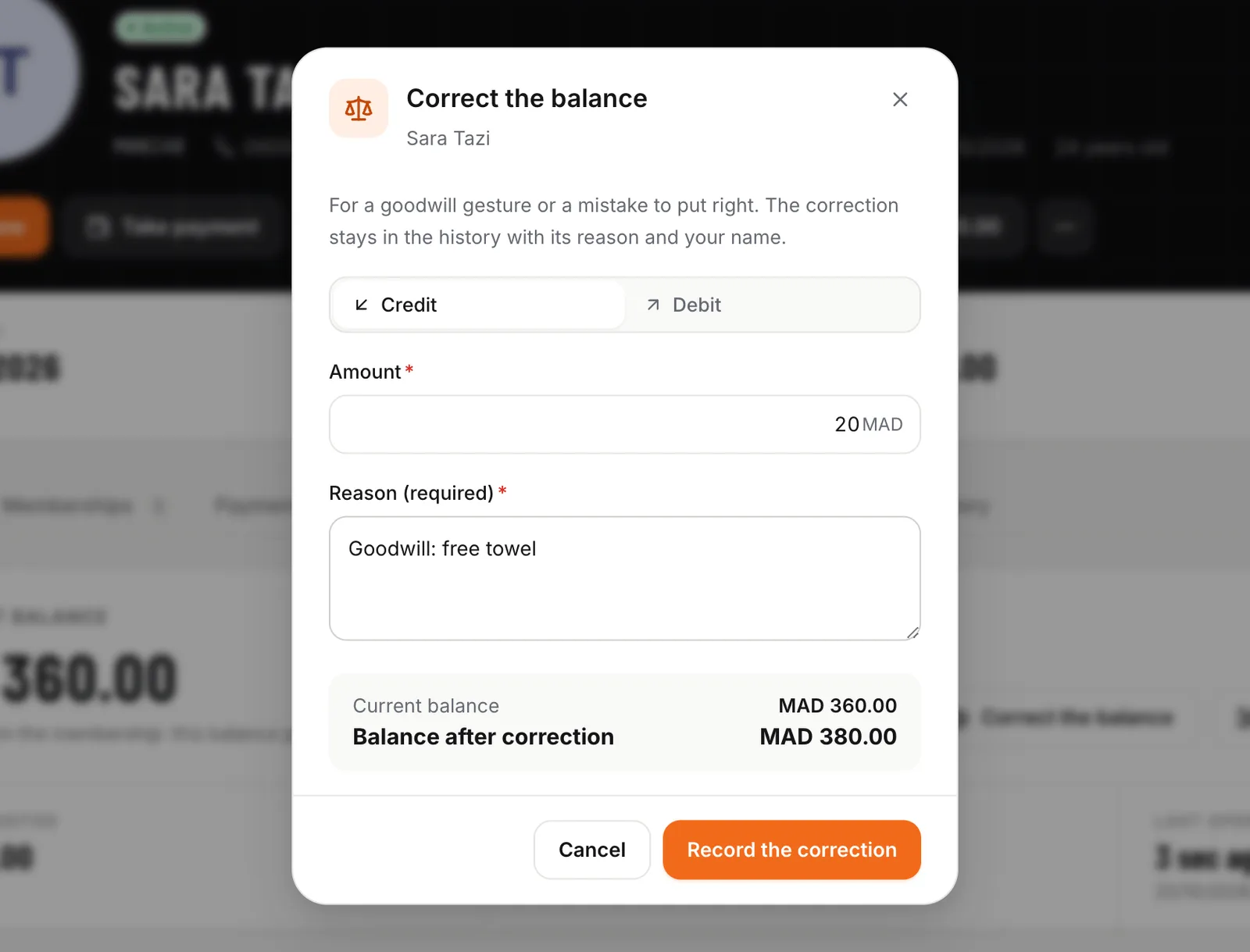
The owner can credit or debit a balance, always with a written reason, kept in the history with their name. For a goodwill gesture or a mistake to put right.
Hand the balance back
The owner can hand the balance back to the member as money: it is recorded as a refund, on a receipt and in the cash register. Only money deposited is handed back; a goodwill credit is spent at the counter.

History and reports
Every operation, and who did it
The wallet history keeps the date, the operation, the amount, the balance after, the receipt or sale number and the person who did it.
Wallet statement
For a member and a period: the opening balance, every operation and the closing balance. As PDF, Excel, CSV or printed.
Member wallets
What the gym holds for its members, top-ups and spending over the period, low or empty balances.
Nothing is edited
A recorded operation can be neither edited nor deleted: a mistake is corrected by a new, visible operation.

Clear accounts
Your revenue figures stay right
A top-up is counted only when it is spent.
A top-up is not revenue: it is money the gym holds for the member until they spend it.
When the wallet pays for a product, Gymza counts the sale once, in revenue, profit and the dashboard. Never the top-up as well.
The cash register does count the top-up as money received: your cash for the day stays right.
For your accountant: top-ups are tracked separately, as amounts owed to members, until they are used.

Setup and plans
Off by default, on in one click
The owner switches it on in Settings → Member wallet. New installations and upgrades both start with it off.

Switching it off deletes nothing
Gymza asks for confirmation. Balances and history are kept and come back when it is switched on again.
Who does what
The front desk sees balances and tops up. Corrections and handing balances back are for the owner and admins, behind the sensitive-section pattern.
No internet needed
Like the rest of Gymza, the wallet works offline: nothing goes online.
An upgrade without surprises
Moving from 1.2.x to 1.3.0 keeps every payment and every member exactly as they were. A safety copy of the database is taken before the upgrade.
Which plans include it?
- The wallet itself (top-ups, the profile tab, the statement, a top-up at renewal) is part of payments: it is included in every plan.
- Paying at the counter needs the shop (stock and counter sales), included in the Advanced plan and Custom licences.
What the wallet is not
- It is not a bank account, a prepaid card or a payment app: it is store credit held by the gym, used at its counter.
- It pays for counter purchases. In version 1.3.0, it does not pay for memberships.
- No interest, no online payment, no member app: top-ups are made at the front desk, by the staff.
Captures of Gymza 1.3.0 on the demo gym, with fictional members. Product names are the demo gym’s own.
Questions about the wallet
Does the wallet balance expire with the membership?
No. The wallet is separate from the membership: its balance does not expire, reset or change when a membership expires, is renewed or frozen. It pays for counter purchases as long as there is money on it.
Can a wallet balance go negative?
No. A wallet never goes below zero. If the balance does not cover the basket, the counter shows what is missing and offers a top-up; you can also take another payment method. A sale is never paid partly from the wallet and partly in cash.
Is a wallet top-up counted in my revenue?
No, the purchase is. A top-up is money the gym holds for the member until they spend it. When the wallet pays for a product, Gymza counts the sale once, in revenue, profit and the dashboard, never the top-up as well.
The cash register does count the top-up as money received, so your cash for the day stays right.
What happens if I switch the wallet off?
Nothing is deleted. After you confirm, no more top-ups or wallet purchases are possible, but balances, history and receipts are kept. They come back exactly as they were when you switch it on again in Settings → Member wallet.
Can a member get their money back?
Yes, the money they deposited. The owner (or an admin) uses “Hand the balance back” on the member’s profile: it is recorded as a refund, on a receipt and in the cash register. A goodwill credit given by the gym is spent at the counter and is not handed back as money.
Which plan includes the member wallet?
The wallet itself (top-ups, the profile tab, the statement, a top-up at renewal) is part of payments: it is included in every plan.
Paying for counter purchases from the wallet needs the shop (stock and counter sales), included in the Advanced plan and Custom licences. The wallet comes with Gymza 1.3.0 and stays off until the owner switches it on.
Step-by-step guides
- Switch the wallet onSettings → Member wallet: one switch, one threshold.
- Top up a walletAmount, payment method, review, receipt.
- Renew and top upThe membership and the top-up in one payment, on one receipt.
- Sell with the walletPay with the wallet, and top up without rebuilding the basket.
- Refunds and the walletRefund a purchase, credit a payment, cancel a sale.
- Correct or hand back a balanceA correction with a reason, or the money deposited handed back.
- The wallet statementOpening balance, operations, closing balance, as PDF or Excel.
- What’s new in GymzaWhat changes in the latest version, and how to install it.
A question about the wallet?
Write to us on WhatsApp or at [email protected]: we help you set it up, in French, Arabic or English.